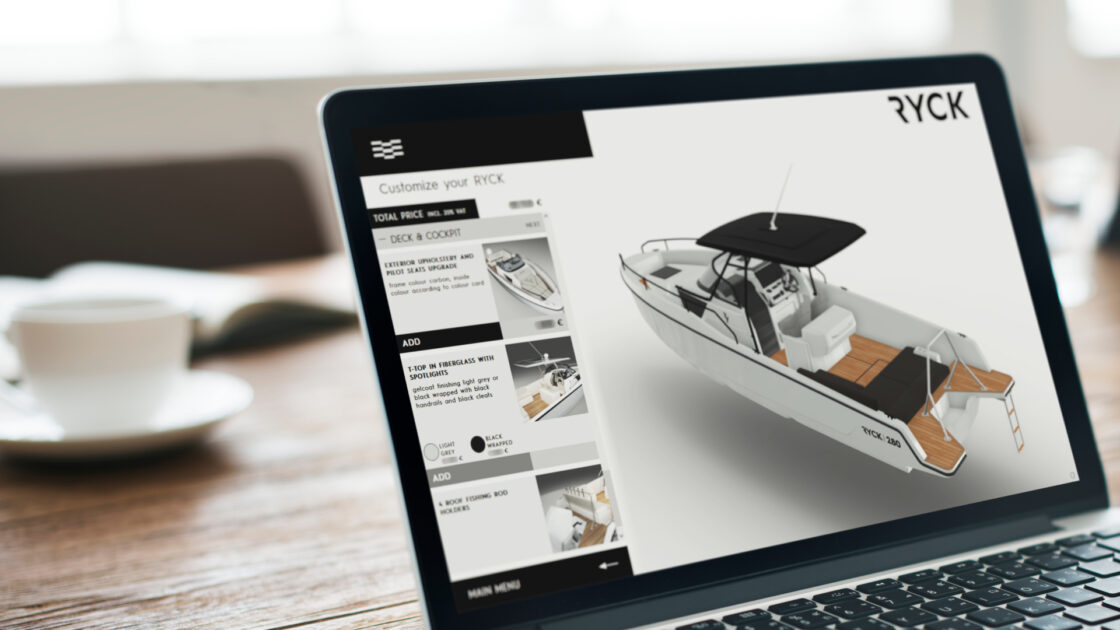

3D configurator examples are everywhere online, but most only show you the experience without analyzing what makes a great configurator and why. At Emersya, we design and deploy real-time 3D product configurators for brands including Vitra, Victorinox, Beyerdynamic and FACOM.
In this article, we’re sharing our top 10 3D configurators worth studying. We break down what makes each one effective: the interactive features that let customers explore and create a personalized version of the product and the measurable business impact it generates through stronger consumer engagement.
Key takeaways
- Interactive 3D product configurators help brands improve buyer confidence, increase conversions and build brand loyalty
- They allow customers to visualize and customize products in real time, to enhance the shopping experience
- 3D and Augmented Reality experiences help reduce returns and boost customer satisfaction
- True-to-life rendering and an intuitive UX are critical for driving sales
- The best 3D configurators include key features such as an interactive product summary, dynamic pricing and save & reload options
- Best practices include integrating seamlessly with eCommerce platforms and production workflows
- Companies across furniture, fashion, automotive, luxury and sportswear use 3D configurators to elevate the consumer experience and facilitate the buyer journey
FREE RESOURCE
3D Configurator Project Planning Template
Use our ready-to-fill, 20-question template to map out your project in under an hour and build a budget-safe, fully aligned plan from day one!

What is a 3D product configurator?
A 3D product configurator is an interactive tool that lets customers explore a product from every angle. It gives users the freedom to build their own version, choosing size, color, material or components, all in real time and always within what the brand can actually manufacture. Powered by real-time 3D rendering technology, this is what makes it a visual product configurator: every product page becomes a dynamic experience where each change appears on screen instantly. It removes the guesswork from online shopping and helps customers make confident decisions based on what they actually see rather than what they have to imagine.
How does the configuration logic work?
Beyond the visuals, every configurator runs on configuration logic behind the scenes. Each time a customer selects an option, the configurator checks compatibility, applies technical constraints and updates automatically, so every configuration a customer builds is one your team can actually produce. The result is an experience that stays seamless, accurate and transparent from the first click to the final choice.
Why are brands investing in interactive 3D experiences?
Online shopping used to mean browsing. Now customers want to explore, build and co-create their own version of a product. Brands that offer this kind of interactive experience see it show up directly in their KPIs: higher engagement, better customer satisfaction and stronger brand loyalty, while helping reduce returns since customers already know what they’re getting before they buy.
So how do you build a 3D configurator that will help you achieve all that? Our team have carefully curated the 10 examples below to highlight which features and UX / UI choices make the biggest impact on customer experience and ultimately on conversion rates.
Top 10 inspiring 3D configurator examples
From furniture to footwear, these are some of the best product configurator examples that show just how far real-time 3D and customization have come. Each one combines design freedom, technical performance and user-centric storytelling. They prove that a well-built configurator can be both beautiful and business-driven.
1. Vitra chair configurators
Built on the Emersya Platform with a custom user interface
Try the Vitra Eames Chair configurator live
Key features
- True-to-life real-time 3D rendering
- Zoom and predefined viewpoints for each configuration step
- 3D display of product dimensions
- Share and replay link
- View in Web AR mode
- Dynamic pricing
What we like
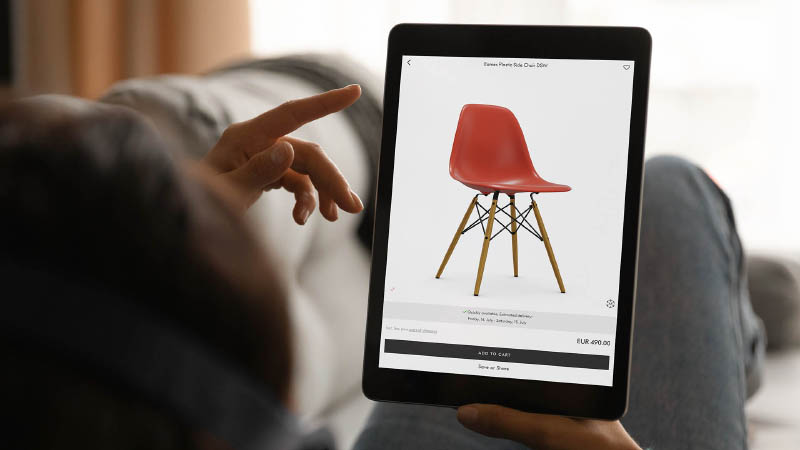
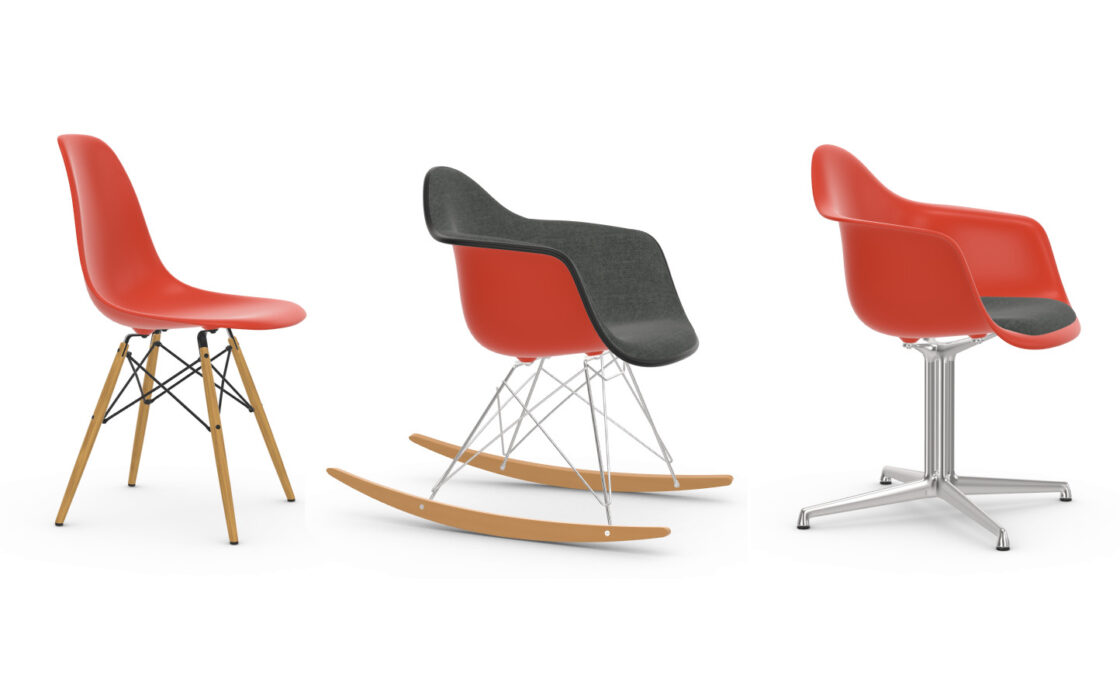
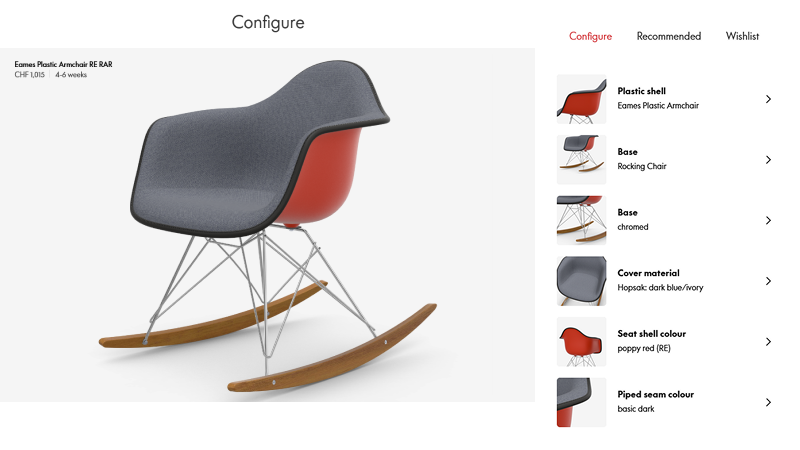
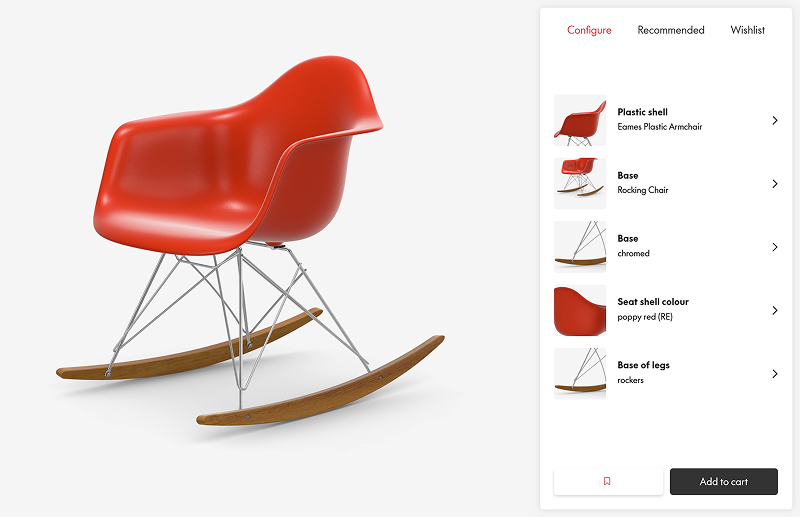
Vitra’s configurator shows how to make a highly configurable, design-driven product feel simple, elegant and genuinely enjoyable to explore. Instead of dropping customers straight into a sea of options, Vitra invites them to browse pre-configured chair versions first. It’s a clever way to spark inspiration and help them compare styles visually before diving into customization.
The menu itself is equally well-thought-out. Every configurable part is represented with high-resolution thumbnails that update in real time as users make changes. This constant visual feedback gives the experience a sense of immediacy and control, the kind of responsiveness that helps customers trust what they see and stay engaged.
Vitra also tackles one of the biggest challenges for furniture manufacturers: fabric overwhelm. With hundreds of upholstery options, the decision-making process can easily become intimidating. Their solution? Smart filters and a comparison tool that guide customers much like an expert sales associate would, helping them narrow choices, understand differences and feel confident about the final selection.
And to top it off, Vitra connects the configurator directly to their ERP system, updating estimated delivery times in real time as customers explore different combinations. It’s a subtle detail, but it turns the configurator into a truly end-to-end experience where 3D visualization and logistics work seamlessly together.
2. Nike By You – Shoe customizer
Custom built with Babylon JS
Try the Nike By You configurator live
Key features
- True-to-life real-time 3D rendering
- Zoom and predefined viewpoints for each configuration step
- Select product parts directly in the 3D view or via the menu
- Menu summary
- Save and share link
- Image generator
What we like
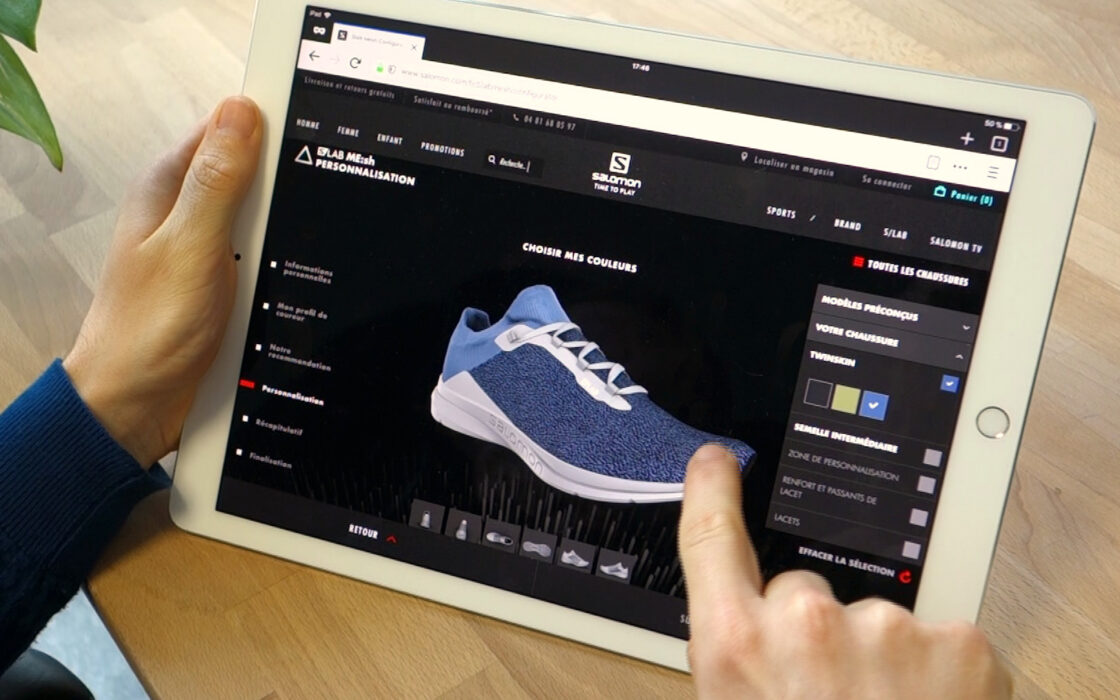
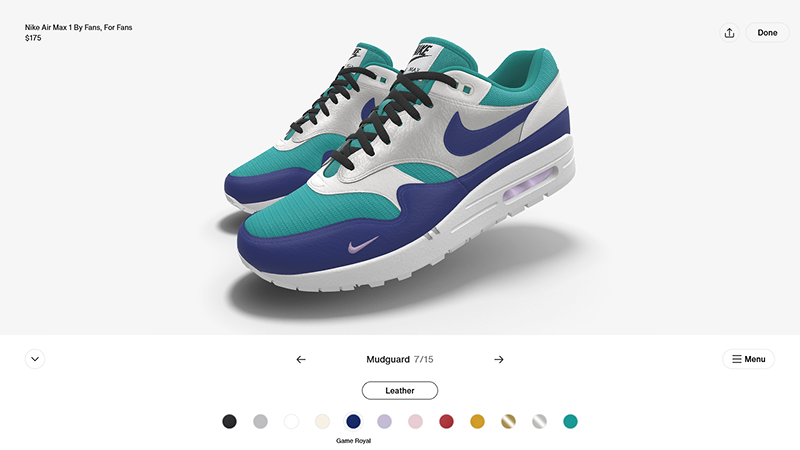
Nike’s ultra-minimalist interface is a masterclass in modern UX. The clean layout makes the customization journey intuitive and mobile-ready, setting a new benchmark for configurator design. Animated highlights guide users through each step, making it clear which product part they are customizing and keeping the flow dynamic.
Breaking the mold, Nike chooses to display both shoes in the 3D view, a bold change from the standard single shoe view offered in all other shoe configurators to date. This subtle yet impactful choice helps users instantly visualize symmetry and gives them a more complete picture of what they’re buying, reinforcing trust and immersion throughout the experience.
Once a design is complete, Nike automatically updates all 8 images on the product display to show the chosen configuration. It seems obvious but very few brands are doing this! It’s an example of how to truly personalize the eCommerce buyer journey and provide a seamless path to purchase.
Customers can create multiple designs of their selected shoe. Each one is saved to the product page under “Your designs,” so they can compare them or reload them back into the customizer. This clever feature invites repeat engagement and turns customization into an ongoing creative process.
3. Beyerdynamic headphones Manufaktur
Built on the Emersya Platform with a custom user interface
Try the Beyerdynamic Manufaktur configurator live
Key features
- True-to-life real-time 3D rendering
- Zoom and predefined viewpoints
- Highlight and select parts directly in 3D view
- Save and share link
- Dynamic pricing
- Apply and edit custom text or image in real time
What we like
Beyerdynamic delivers an experience that feels both premium and playful, which is not an easy balance to strike for a highly technical product. The interface is beautifully decluttered: clean menus, discreet info buttons and just the right amount of guidance. Instead of overwhelming users with explanations, the configurator offers help only when needed, keeping the focus on the product and the creative flow.
One standout feature is the built-in image library, which lets anyone jump straight into personalization even if they don’t have a perfectly prepared image on hand. It removes a major barrier and makes the experience instantly accessible: customers can experiment, try ideas and create their own style without friction.
The image editing tools (resize, rotate, reposition, apply filters) are smooth, intuitive and feel almost app-like in their responsiveness. There’s a genuine spark of excitement when users see their artwork wrap perfectly onto the earcups in real time. This instant visual feedback creates a sense of ownership early in the journey, which is essential for emotional buy-in and conversion, especially for premium audio gear. For brands with customizable or semi-technical products, this is a great example of how to make the experience feel empowering, premium and fun, all at the same time.
4. Victorinox Swiss Army Knife configurator
Built on the Emersya Platform with a custom user interface
Try the Victorinox B2B configurator live
Key features
- True-to-life real-time 3D rendering
- Zoom and predefined viewpoints
- Product summary
- Save and share link
- Image generator
- Product animations
What we like
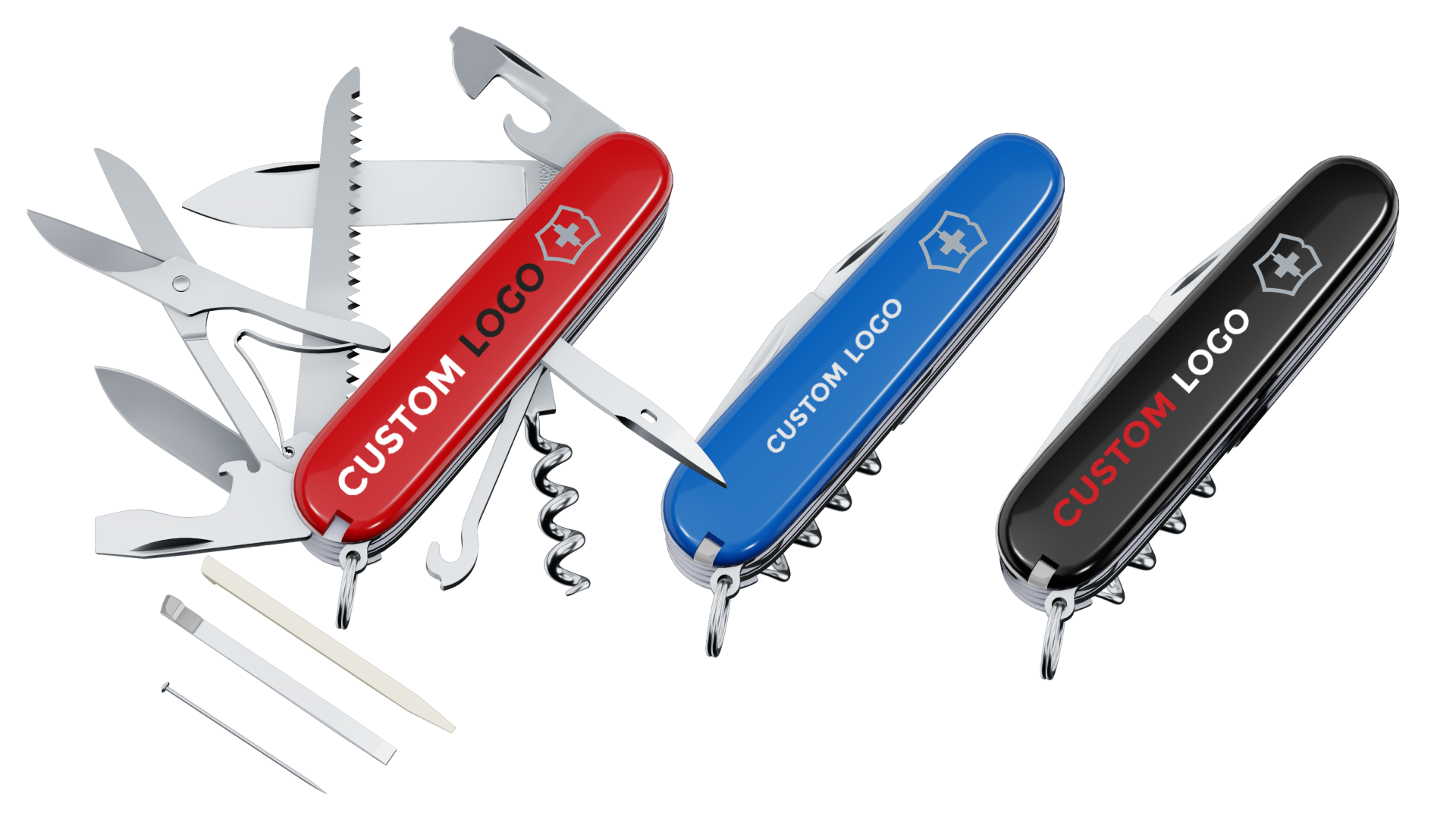
Victorinox turns corporate gifting into a premium B2B experience. When a customer uploads their logo, the configurator automatically detects color information and assigns Pantone codes. Customers can specify or edit the Pantone color codes, choose the printing method and the number of colors they wish to include in the print.
Offering this level of control is rare in online product customization and especially valuable for corporate customers, where color accuracy and brand consistency are non-negotiable. This ensures every logo is printed with the exact tone and finish, giving customers the confidence to approve and place their order without needing physical samples. Logos can even be applied to the knife blades, with realistic 3D previews of the metal etching effect, a subtle yet powerful feature for visual accuracy.
This configurator isn’t just impressive from a front-end perspective. It’s equally powerful behind the scenes. Because Victorinox doesn’t sell its corporate gifts directly online, the configurator has a robust back-end system to automate quotations and generate sales orders. Each quote request is saved with the customer’s selected options, a preview image, a replay link and the original uploaded logo files. The system can then produce production-ready assets and PDF quotes automatically, streamlining both the sales and production workflows. The result is a seamless process that saves valuable time, reduces manual errors and keeps the customer experience as efficient as it is premium.
5. Adidas custom uniform configurator
Custom built
Try the Adidas team kit configurator live
Key features
- Real-time 3D rendering
- Zoom
- Add custom logos to predefined areas
- Dynamic pricing
- Order details summary
What we like
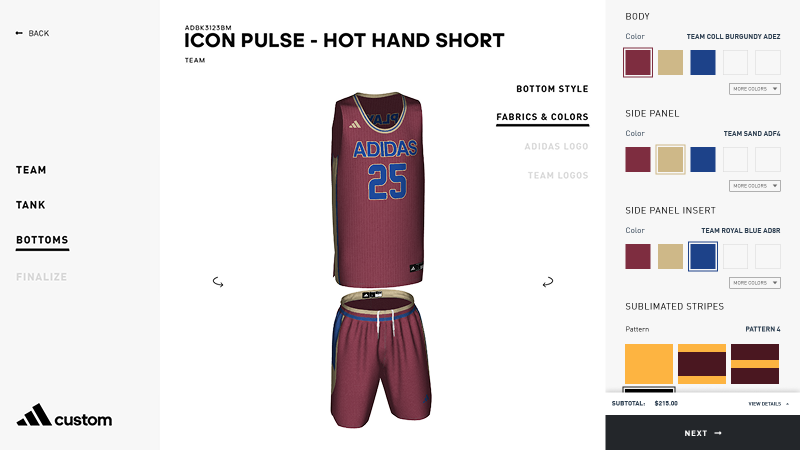
Designed for teams, schools and organizations, this configurator extends customization to the collective level. The experience starts strong: once users choose their team’s main colors, the tool immediately suggests complementary combinations to preview in real time, a smart use of guided creativity.
Another standout part of the customization journey is how the tool facilitates adding multiple items. Finish designing a jersey and the configurator automatically suggests matching shorts or accessories, pre-applies the team colors and then invites further customization. It’s a small detail, but one that makes the entire process feel cohesive, efficient and thoughtfully designed, especially for coaches or players juggling multiple items and design decisions at once.
As with most configurators the experience ends on a final design confirmation page. This one brings everything together: previews from multiple angles, a detailed breakdown of choices and downloadable PDFs ready for team approval or reorder. It feels professional, complete and perfectly adapted to how teams make decisions collectively.
For brands designing tools for group purchases or multi-item configurations, this is a powerful example of how to combine structure, inspiration and practicality into a single, engaging flow.
FREE RESOURCE
3D Configurator Project Planning Template
Use our ready-to-fill, 20-question template to map out your project in under an hour and build a budget-safe, fully aligned plan from day one!

6. McLaren sports car configurator
Custom built
Try the McLaren configurator live
Key features
- Interactive 3D view
- Zoom and predefined viewpoints
- Product animations (e.g., opening doors)
- Switch between exterior and interior view
- Configuration summary button
- Save & replay (unique code + QR code)
- Downloadable PDF with configuration summary and images
What we like
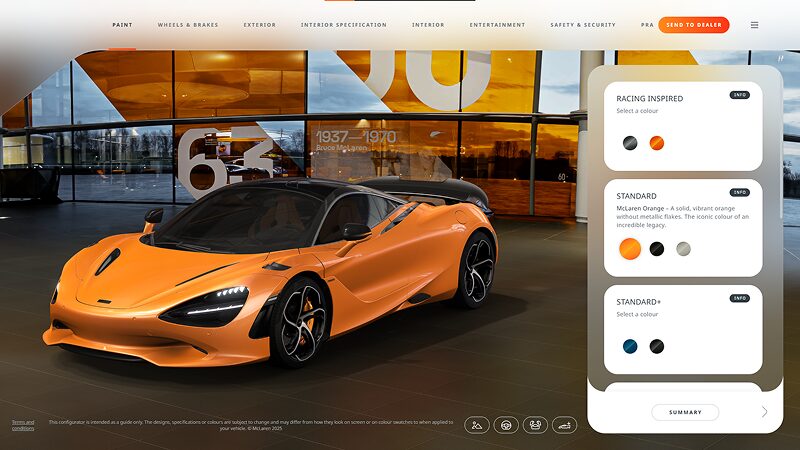
What stands out most about McLaren’s configurator is how meticulously it has been designed. Every detail has been considered to create a smooth, informed and enjoyable buyer journey perfectly aligned with its audience and product. The experience strikes a rare balance between technical precision and emotional impact, guiding users effortlessly through a complex configuration process.
Customers can move step by step using navigation arrows or skip to specific steps via the top menu. This intuitive and flexible design choice gives users full control of their own journey. Info buttons provide additional context on each option to facilitate decision making without cluttering the interface, while the editable configuration summary makes refining choices fast and intuitive.
The ability to visualize the car in different environments, from a neutral showroom to outdoor lighting, and to move inside the cabin to explore the interior with the same level of detail as the exterior, adds an impressive layer of realism. These touches make the entire experience genuinely fun and recreate the excitement of walking into a showroom for the first time, seeing “your” car come to life right in front of you.
7. Tylko shelving configurator
Custom built with three.js
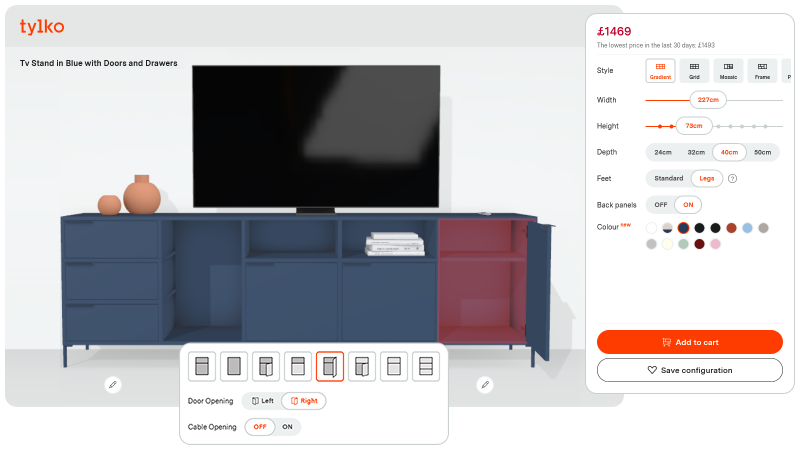
Try the Tylko configurator live
Key features
- Interactive 3D view
- Product animations (doors and drawers)
- Display of dimensions in 3D view
- Configuration summary
- Dynamic pricing and discounting
- Save & share link
- Save and send via email
What we like
Tylko’s configurator shows just how effortless complex product configuration can feel when the experience is well designed. Their shelving system has almost unlimited options making it a configurator planning nightmare! Yet Tylko manages to make the entire journey feel intuitive and enjoyable. By structuring the process into clear steps and allowing deeper customization directly from the 3D view, they give customers creative freedom without cognitive overload. For brands dealing with configurable or modular products, this is exactly the balance to aim for: empowering users while keeping the experience fluid and confidence-building.
What really sets this configurator apart is how thoughtfully it handles context. Instead of showing the shelving unit floating in a white void, Tylko adds a floor, a wall and even everyday objects that reposition themselves depending on the chosen design. This subtle layer of environmental storytelling helps customers picture the product in a real space, anticipate scale and make faster decisions, all of which directly support goals like accelerating purchase decisions, improving customer satisfaction and reducing returns.
And while the configurator is the hero, Tylko doesn’t forget the rest of the buyer journey. Smart UI cues gently guide users toward important sections of the product page: detailed specs, lifestyle imagery and real-life customer examples. These touchpoints enrich understanding and eliminate friction, ensuring that every question a shopper might have is answered, without breaking the flow of the experience. This holistic approach is exactly what brands need when they want to elevate their digital shopping experience: a seamless bridge between inspiration, visualization and decision-making.
8. Veldt motorcycle helmet configurator
Built on the Emersya Platform
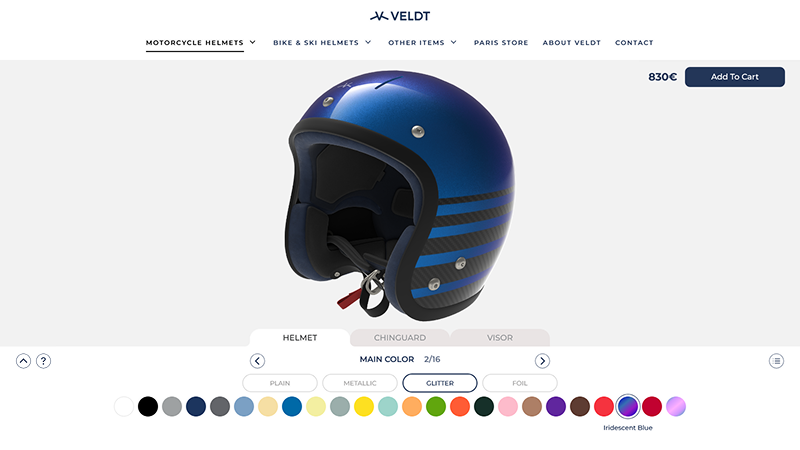
Try Veldt’s helmet configurator live
Key features
- True-to-life real-time 3D rendering
- Zoom and predefined viewpoints
- Dynamic pricing
- Save and share link
- Image generator
What we like
Veldt shows how to take inspiration from the minimalist, modern menu style popularized by Nike By You and adapt the design beautifully for a more complex, multi-layered product. Each of the three main helmet components has its own dedicated tab, keeping the customization journey organized and digestible. An additional navigation menu lets customers jump straight to any specific option without scrolling, a small but incredibly effective detail for keeping the experience fast, fluid and frustration-free.
The other standout feature is the quality of the real-time 3D rendering. Veldt offers multiple paint finishes for their helmets, including metallic, glitter and iridescent, and the configurator captures each one with remarkable accuracy. The way colors shift under light and the subtle texture variations are far beyond what static photos can deliver. For customers, this means a preview that feels trustworthy and true-to-life, making it easier to commit to a color or finish they’ve never seen in person. For brands, offering high-end rendering elevates the overall shopping experience to match the quality of the physical item.
9. FACOM Jetline workshop configurator
Built on the Emersya Platform
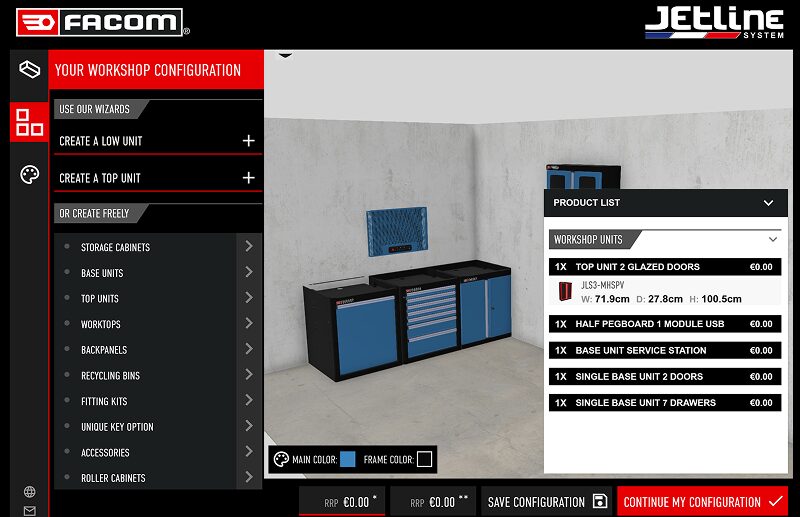
Try FACOM’s workshop configurator live
Key features
- True-to-life real-time 3D rendering
- Full configuration of customer’s space
- Drag & drop products into customer’s space
- Integrated room-planning features to place, rotate, duplicate, delete and customize each unit
- Multi-language configurator
- Dynamic pricing
- Save, share and reload configurations
- Help document
- Contact sales team button
What we like
The FACOM Jetline System configurator takes product customization to an entirely different league. This isn’t just a configurator, it’s a full workshop planning experience, designed for professionals who need precision, flexibility and total control. Jetline is one of the most modular workshop systems on the market, yet the tool manages to make even the most advanced configurations feel structured, guided and surprisingly intuitive.
What really stands out is the three-stage configuration flow, which mirrors how customers naturally think about setting up their workspace: configure the space, choose and configure the units, customize all or each individual unit. First, users recreate their workshop environment, adding doors, windows, pillars and other architectural elements to reflect the real layout. Being able to customize wall and floor materials gives them an instant sense of immersion, both exciting and reassuring, and helps them picture how their future workshop will truly look and feel.
From there, customers can configure their Jetline units in multiple ways. They can drag and drop standard modules directly into their space, or switch to a Wizard mode that lets them assemble a custom unit step-by-step in 2D before dropping it into the 3D room. This dual approach offers the best of both worlds: creative freedom for experienced users and structured guidance for those who need a clearer path. It also reduces the number of one-off “special request” configurations that sales teams typically have to handle manually. Overall, this configurator shows how a deeply modular, professional product line can still deliver a smooth, empowering and confidence-inspiring experience.
10. KIKOiD – KIKO Milano’s instore cosmetics customizer
Built on the Emersya Platform
Key features
- Interactive 3D view
- Predefined viewpoints for each configuration step
- Product animations (open/close lids and caps)
- Apply custom text in real time
- Multi-product configuration workflow
- Direct export of production files to in-store engraving machine
What we like
KIKOiD stands out because it brings the creativity and freedom of digital customization directly into the physical store. Unlike the online configurators featured above, this experience is deliberately exclusive, available only in KIKO’s flagship stores and designed to elevate the in-store journey. Large touchscreen terminals make the experience feel immersive and premium, inviting customers to explore bestsellers, choose their shade and personalize the packaging using an intuitive 3D customizer.
One of the highlights is the multi-product workflow, which mirrors how makeup shoppers naturally browse before personalizing. But the real “wow” moment comes at the end: the configurator connects directly to an in-store laser engraving machine, so customers can watch their message being engraved in real time. This moment of transformation is not only satisfying and memorable; it reinforces the value of personalization and deepens emotional connection to the product.
For brands exploring omnichannel strategies or looking to differentiate their store experience, KIKOiD is an inspiring example of how real-time 3D, personalization and physical production can be woven together into a high-impact, high-engagement retail experience.
FREE RESOURCE
3D Configurator Project Planning Template
Use our ready-to-fill, 20-question template to map out your project in under an hour and build a budget-safe, fully aligned plan from day one!
What can brands learn from these 3D configurator examples?
Step back from the details and all ten of these configurators share the same foundation. The brands that win aren’t just placing a 3D viewer on a product page. They’re combining high-quality real-time visualization, intuitive UX design and well-connected data systems. Together, these three elements turn a configurator from a nice interactive experience into a scalable growth engine.
1. High-quality, real-time visualization builds trust
Across all the examples, from Vitra to McLaren to Veldt, one thing is obvious: visual quality matters.
When customers can see how a product reacts to light, how textures behave, how colors play together in real time, they trust what they see, feel more confident about their choices and are willing to commit without needing physical samples.
That’s especially critical for:
- high-value products (cars, furniture, luxury goods)
- personalized products (engraved knives, custom pens, team uniforms)
- complex finishes (metallic, glitter, iridescent, textured fabrics)
High-fidelity real-time visualization is what allows brands to reduce returns, maintain a premium image and make online buying feel as reassuring as an in-store experience.
2. Intuitive UX lets customers self-configure without friction
The best configurators in this list all share one UX principle: they make complex products feel simple.
They use patterns like:
- clear, step-by-step flows
- minimal, decluttered menus
- contextual help (e.g. info buttons, highlights, guided suggestions)
- smart shortcuts (e.g. jump to sections, automatic viewpoint updates, pre-applied colors, saved designs)
This kind of UX doesn’t just “look nice.” It has very concrete business effects:
Customers can self-configure without assistance
→ fewer support questions → shorter sales cycles → less operational overhead
Customers make decisions faster and more confidently
→ higher conversion rates → fewer abandoned sessions → fewer “I chose the wrong size/color/module” returns
In other words: good UX scales. It lets your teams handle more demand with the same headcount, and deliver better outcomes while doing it.
3. Connected data systems turn configurators into business tools
The most advanced examples, like Victorinox, Vitra or KIKO, show that a configurator is not just a front-end experience. The real power comes when it’s plugged into the brand’s data and production systems.
For example, a connected configurator can:
- auto-generate the customer’s selected options and price, pushing them straight to your eCommerce platform or CMS for automated sales
- auto-generate quotes and orders and send them straight into your ERP or order management system, giving you streamlined and efficient sales and production workflows that scale
- auto-generate production files directly from the customer’s configuration and push them into your manufacturing systems, cutting manual rework and the risk of costly errors
- turn every click into data for your analytics tools, giving your product and marketing teams real insight instead of guesswork
A 3D configurator fully integrated into your existing tech stack unlocks three major levers:

You don’t need to manufacture every variant upfront
Instead, you can move towards a made-to-order production model by gathering demand (and sales) through the configurator before you start manufacturing. This enables you to offer a wide range of options, without generating overstock or dead inventory that fills up the warehouse.
This is mass customization at scale: more efficient and more sustainable.
Product data becomes structured and reusable
Each configuration can feed manufacturing, logistics and forecasting. Product and marketing teams can gain valuable insights from the configurator to see which options are trending. This real-life customer data can help create future collections and offers that are perfectly aligned with what customers want.
Bottom line: Less manual work, better decisions, faster iterations.
The experience remains consistent from first click to final product
A rules-based configurator that can auto-generate quotes and production files, reduces the potential for error between the customer’s order and what is produced and shipped. Couple that with true-to-life 3D visualization and the customer is sure to receive exactly what was promised on screen.
Looking at all these examples side by side, the pattern is clear:
High-quality real-time visualization + intuitive UX + connected data systems = scalable growth
That combination allows brands to:
- let customers configure on their own, without hand-holding
- shorten decision cycles and boost conversion, while reducing returns
- sell more variants with less inventory risk
- reuse configuration data across design, manufacturing, logistics and marketing
For teams in marketing, product, eCommerce or innovation, this is the real opportunity. A 3D configurator is a strategic choice that can reshape how you sell, how you produce and how you learn from your customers.
What key features should a great configurator include?
- Real-time rendering with true-to-life quality: Shoppers expect to see every component, color, material and texture the way it actually looks. High-fidelity rendering and smooth transitions make the difference in perceived quality and customer engagement.
- Intuitive, responsive UX: Whether on desktop, mobile or tablet, the experience should be effortless. A clear layout, fast loading and intuitive controls keep users immersed and prevent drop-off during the buying process.
- Dynamic pricing and an interactive product summary: Every choice should update price, configuration and conditional logic instantly. This reassures users and simplifies decision-making, especially for complex products with lots of customization options.
- Save & reload options: Letting customers return to their design, share it or compare versions nurtures engagement and brand loyalty, while giving sales teams an opening to follow up with personalized offers.
- Seamless integration with eCommerce and production systems: The configurator should connect effortlessly to your CMS, PIM, ERP or eCommerce platform to keep data consistent and the path to purchase smooth.
- Compatibility with AR and mobile: Letting customers view a product in Augmented Reality, or test it in their real environment, is becoming standard. It reinforces customer satisfaction and bridges online exploration with real-world decision-making.
Should you build your own or choose a platform?
Every 3D configurator runs on a combination of visual rendering technologies and logic-driven systems: typically a web-based 3D viewer or JavaScript library (Three.js and Babylon.js are common choices), WebGL to power real-time rendering in the browser, a rules engine to keep configurations valid and HTML, CSS and JavaScript to handle the interface itself.
Companies can assemble these pieces to build a configurator from scratch, or rely on a dedicated 3D platform like Emersya’s, which brings a built-in real-time 3D engine, a WebGL-powered viewer, a rules engine and a JavaScript API together in one place, designed to integrate with custom user interfaces, eCommerce systems and production workflows. Either route can work. What matters is being clear early on about which trade-off you’re making: development time and in-house control on one side, speed to launch and ongoing platform support on the other.
Ready to build your own 3D configurator?
3D configurators aren’t limited to niche or high-tech brands anymore. The examples we explored together demonstrate how companies of different sizes, across furniture, sports equipment, automotive, industrial equipment and consumer electronics, are using them to present and sell their customizable products.
The ten configurators above all started the same way. A brand looked at its products, decided a static product page wasn’t showing customers enough and worked out how to design a 3D configurator for their specific case. That’s the part that’s hard to shortcut. Vitra’s smart filters, Victorinox’s Pantone matching and FACOM’s three-stage room planner all came from clear, detailed project specifications.
Whether you are pitching the idea internally or ready to brief potential 3D configurator providers, it helps to get a clear brief down on paper detailing:
- what you’re trying to achieve
- which product options and configuration rules the configurator needs to handle
- what 3D assets you already have
- where you need a connection into your existing infrastructure to support the rest of the buyer journey
To help with that, we’ve put together a Configurator Project Planning Template: a free, ready-to-use worksheet that walks you through the same questions we ask brands before scoping a 3D product configurator project. It’s built to help you set your priorities, spot technical or organizational blind spots early and create a clear brief you can share internally or use to compare providers.
FREE RESOURCE
3D Configurator Project Planning Template
Use our ready-to-fill, 20-question template to map out your project in under an hour and build a budget-safe, fully aligned plan from day one!
You don’t need all the answers to start. Use it to find them.
If you’d rather talk it through first, we’re always happy to walk you through what a configurator could look like for your own products.